Vibe Coding XR: Accelerating AI + XR prototyping with XR Blocks and Gemini
March 25, 2026
Ruofei Du, Interactive Perception & Graphics Lead, and Benjamin Hersh, Product Manager, Google XR
Vibe Coding XR is a rapid prototyping workflow that empowers Gemini Canvas with the open-source XR Blocks framework to translate user prompts into fully interactive, physics-aware WebXR applications for Android XR, allowing creators to quickly test intelligent spatial experiences in both simulated environments on desktop and on Android XR headsets.
Large language models (LLMs) and agentic workflows are changing software engineering and creative computing. We are seeing a shift toward “vibe coding”, where LLMs turn human intent directly into working code. Tools like Gemini Canvas already make this possible for 2D and 3D web development. However, extended reality (XR) remains difficult to access. Prototyping in XR typically requires piecing together fragmented perception pipelines, complex game engines, and low-level sensor integrations.
Quick, vibe-coded prototypes can solve this problem. They help experienced developers test new UIs, 3D interactions, and spatial visualizations directly in a headset. This rapid validation can save days of work on ideas that might eventually be discarded. It also makes it easier to build interactive educational experiences that demonstrate natural science and mechanics.
Today, we are announcing Vibe Coding XR to bridge this gap. This workflow uses Gemini as a creative partner alongside our web-based XR Blocks framework. By combining Gemini’s long-context reasoning with specialized system prompts and curated code templates, the system handles spatial logic automatically. It translates natural language directly into functional, physics-aware Android XR apps in under 60 seconds.
Our team will present an onsite demonstration at the Google Booth at ACM CHI 2026. You can also try it out here today.
A walkthrough video of Vibe Coding XR: XR Blocks Gem turns a single prompt “create a beautiful dandelion” into an Android XR experience in under 60 seconds.
The Vibe Coding XR workflow
Over the last year, we have been iteratively designing and improving the Vibe Coding XR journey to be seamless and accessible. Here’s an example:
- Users describe what they want without any prior knowledge of XR: A user opens the XR Blocks Gem with Chrome on an Android XR headset (such as Galaxy XR). They type a prompt with a keyboard or their voice, such as “Create a beautiful dandelion.” Optionally, they can use Chrome on desktop to create the XR application and preview with XR Blocks’ built-in simulator.
- Gemini designs and implements the XR experience: Learning from samples of XR Blocks, Gemini uses their multi-step planning abilities and advanced reasoning to configure the scene, perception, and interaction, then build interactive XR applications.
- Live demo with rapid iteration: In Android XR, the user performs a pinch gesture at the “Enter XR” button to instantly see the result — an animated dandelion that blows away upon a pinch interaction. Users can further click the “Share” button to create a shareable public link for their app.
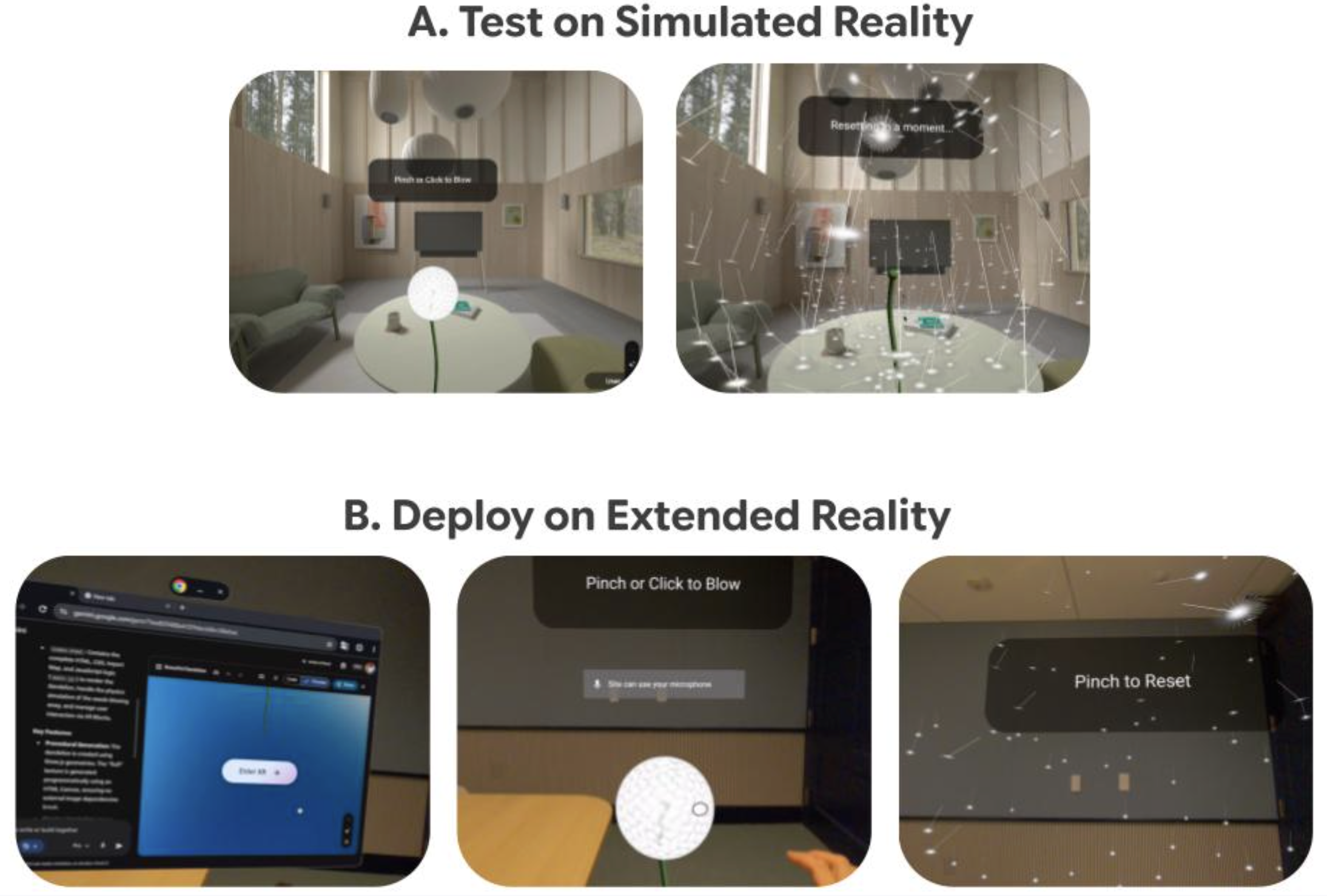
To facilitate easier testing, we also provide a “simulated reality” environment on the desktop Chrome. This allows creators to rapid-prototype and test interactions prior to deploying them on Android XR devices. Many advanced perceptual features such as depth sensing, hands interaction, and physics are best experienced on Android XR.

Our framework accelerates AI + XR prototyping by allowing users to (A) test their “vibe coding” results on desktop in a simulated reality environment, and (B) deploy the same demo on an Android XR headset with body and hand interactions.
Technical brief of Vibe Coding XR
Vibe Coding XR leverages the long-context capabilities and thinking process of Gemini to function as an expert XR designer and engineer. We developed a specialized system prompt that “teaches” Gemini with the XR Blocks architecture and samples, including guidelines for room-scale XR environments, package management, and best practices for XR interaction.
The underlying XR Blocks framework is built upon accessible web technologies like WebXR, three.js, and LiteRT.js. Its core engine manages the complex interplay of subsystems required for spatial computing, including environmental perception, XR interaction, and AI integration. Our prompt context includes the following components:
- Persona & guidelines: Establishes the LLM as a domain expert following best practices for room-scale XR environments (e.g., spatial layout, scale, and interaction distances).
- Package management: Specifies how dependencies within XR Blocks should be handled and enforces recommended default styles.
- Source code & templates: Provides the source code of a curated set of XR Blocks templates and samples within the context window. This grounding reduces hallucination and encourages strict adherence to valid API calls and established design patterns.
Application scenarios: From prompt to reality
We demonstrated the versatility of the Vibe Coding XR workflow with example prototypes generated via vibe coding:
- Math tutor: Prompted by “Visualize Euler's theorem in geometry. Explain vertices, edges, and facets concepts with highlighting using different examples.” Gemini smartly chooses a tetrahedron, a cube, and an octahedron as three examples, visualizes them in XR, and allows users to pinch on different highlighting strategies.
Vibe-coded Math Tutor app that allows students to learn geometries in 3D.
- Physics lab: Prompted by “Create an interactive physics experiment: given different objects on each side of the scale, use different weights (with labels on them) to balance the scale.” XR users are able to pick and drop different weights to intuitively learn how a basic level-based scale works in the real world.
Vibe-coded physics lab app that enables hands-on physical experiments.
- Immersive chemistry: Prompted by “Create an interactive chemistry lab that users can pinch to ignite and observe three experiments: Ignite methane in air and place a dry, cold beaker over the flame: the flame is pale blue, and liquid droplets form on the inner wall of the beaker. Ignite ethylene in air: the flame is bright, black smoke is produced, and heat is released. Ignite acetylene in air: the flame is bright, thick smoke is produced, and heat is released.” Gemini designs educational cards and renders 3D volumetric visualizations for each experiment, facilitating a safe, interactive mixed-reality experience.
Vibe-coded immersive chemistry app that simulates interactive chemistry experiments.
- Schrödinger's cat: Prompted by “An aesthetically pleasing depiction of Schrödinger's cat in XR. Finger pinch makes a cat (detailed 3D model) go into the box. Approaching the box within 50cm makes the box become two that move to the left and right and the box's front wall becomes transparent. You see both versions of the cat inside (dead and alive), demonstrating the quantum state. When you pinch again, one of the states becomes reality. The box opens and you see it either alive or dead. With another pinch you can start again.” Gemini explains quantum state demonstration where users pinch to guide a 3D cat into a box. Approaching it splits the box to reveal both the alive and dead states simultaneously, while another pinch collapses the superposition into a single reality.
Vibe-coded Schrödinger's Cat app for explaining quantum concept in XR.
- XR sports: Prompted by “Let me play volleyball with hands and collide with my environment. Volleyballs are textured and launched from a red ring slowly and easier to bounce with the hand.” Gemini creates a textured ball with which to play that reacts to both hands and the physical environment.
Vibe-coded XR volleyball app that enables rapid prototyping of mixed-reality sports.
- XR dino: Prompted by “Create the Chrome Dino game in XR. Dino is voxelized in front of the user, with every cactus rushing towards the user on a semi transparent lane. Add audio.” Gemini creates the XR version of the classic Chrome Dino game, significantly reducing the prototyping time from hours to minutes.
Vibe-coded XR dino app that enables rapid prototyping of mixed-reality games.
We prompt with more specific context, such as using NASA Exoplanet Data, procedural generation, or creating high-resolution textures in the XR Blocks Gem, and demonstrate iterative refinement in the Vibe Coding XR process:
From left-to-right or top-to-bottom: Immersive visualization of NASA star map, procedural generation of a city map, exploring an ancient Egyptian pyramid.
Preliminary technical evaluation
Evaluating XR applications has always been a challenge, largely because it typically requires hands-on, on-device testing and subjective human evaluation. To test the effectiveness of our Vibe Coding XR pipeline, we built a preliminary dataset of prompts to create XR apps: VCXR60.
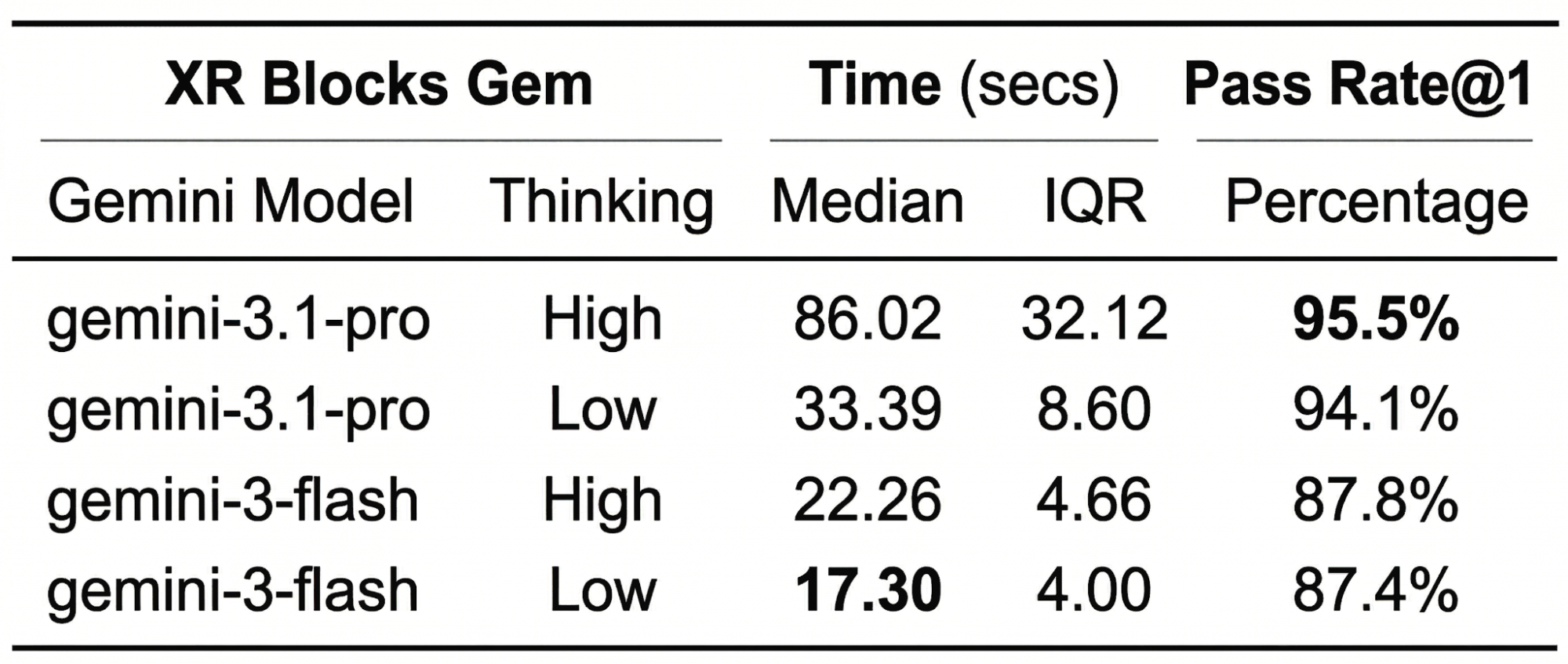
Sourced from four one-hour internal workshops, VCXR60 consists of 60 unique prompts provided by 20 Googler participants. Using this dataset, we measured both inference time and the one-shot success rate, specifically looking for zero-error executions within the XR Blocks simulated reality environment. For example, a simple prompt, “Create a beautiful dandelion that blows away when I pick it up,” will likely finish in under 20 seconds in Gemini Flash, but has a higher chance of runtime errors compared to Gemini Pro, because handling animation and hands interaction requires more tokens during the thought process.
Early on, we found that the majority of initial errors stemmed from bugs within XR Blocks itself or from hallucination of non-existing or deprecated APIs, yielding an approximate 70% success rate. These insights fueled a rapid six-month iteration cycle. Today, after 11 major releases, we are excited to share the preliminary evaluation of XR Blocks Gem v0.11.0 on the VCXR60 dataset as a baseline reference.
Our top takeaway for developers: when diving into advanced XR prototyping, utilizing “Pro Mode” yields the most reliable results.
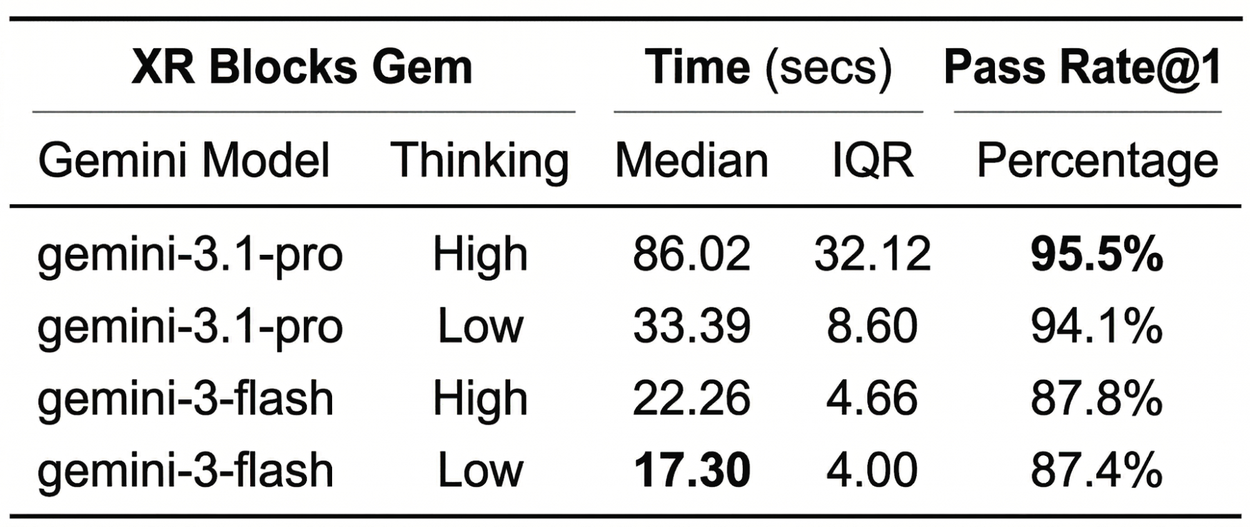
Inference time and one-shot success rate for XR Blocks Gem on VCXR-60 datasets with 5 runs. IQR (interquartile range) is defined as the difference between the 75th and 25th percentiles of the data. We used Gemini “preview” models in March 2026 in the evaluation.
Conclusion
Vibe Coding XR marks a pivotal step toward a future where spatial computing is limited not by technical expertise, but by creativity. By coupling the reasoning capabilities of LLMs with the high-level abstractions of XR Blocks, we bridge the gap between a fleeting thought and a tangible, physics-aware reality.
Our team is continuously working towards the XR Blocks framework, benchmarking, and spatial intelligence. We invite the HCI (human–computer interaction), AI, and XR communities to contribute to this XR Blocks ecosystem on Android XR. You can access the open-source framework and try the live demo in the quick links or come to visit our demo at ACM CHI 2026.
Acknowledgements
This work is a collaboration across multiple teams at Google. Key contributors to this project include Ruofei Du, Benjamin Hersh, David Li, Xun Qian, Nels Numan, Zhongyi Zhou, Yanhe Chen, Xingyue Chen, Jiahao Ren, Robert Timothy Bettridge, Faraz Faruqi, Xiang 'Anthony' Chen, Steve Toh, and David Kim. The following researchers and engineers contributed to the XR Blocks framework: David Li and Ruofei Du (equal primary contributions), Nels Numan, Xun Qian, Yanhe Chen, and Zhongyi Zhou, (equal secondary contributions, sorted alphabetically), as well as Evgenii Alekseev, Geonsun Lee, Alex Cooper, Brandon Jones, Min Xia, Scott Chung, Jeremy Nelson, Xiuxiu Yuan, Jolica Dias, Tim Bettridge, Benjamin Hersh, Michelle Huynh, Konrad Piascik, Ricardo Cabello, and David Kim. We further thank the Gemini Canvas and AI Studio teams for their support including, but not limited to: Tim Bettridge, Yan Li, Daniel Marques, Deven Tokuno, Levent Yilmaz, Saravana Rathinam, Samuel Petit, Mike Taylor-Cai, Ammaar Reshi, and Robert Berry, We would like to thank Mahdi Tayarani, Max Dzitsiuk, Jim Ratcliffe, Patrick Hackett, Seeyam Qiu, Coco Fatus, Alon Hetzroni, Aaron Kim, Yinghua Yang, Brian Collins, Eric Gonzalez, Keith Moon, Nicolás Peña Moreno, Yidang Zhang, Jamie Pepper, Yuhao He, Yi-Fei Li, Ziyi Liu, Jing Jin for their feedback and discussion on our early-stage proposal and WebXR experiments. We appreciate Tim Herrmann and Andrew Helton’s thoughtful reviews. We thank Maryam Sanglaji, Max Spear, Adarsh Kowdle, and Guru Somadder, Shahram Izadi for the directional feedback and contribution.
Other posts of interest
-

September 3, 2026
Transfer learning for genomic prediction in underrepresented populations- General Science ·
- Machine Intelligence
-

September 3, 2026
A connectomics milestone: Mapping the complete male fruit fly brain- General Science ·
- Health & Bioscience ·
- Machine Intelligence ·
- Open Source Models & Datasets
-

September 1, 2026
Mapping global methane emissions from space with deep learning- Climate & Sustainability ·
- Earth AI ·
- Machine Intelligence